SuperAdmin user
SuperAdmins access the internal administration panel (Django Admin). This panel is used for sensitive settings, such as user and permission management.
Typical responsibilities
- Administer users (including in Institutions with manual validation (Curation))
- Define Institution admins (and, consequently, allow admins to manage Places below them)
- Maintain global instance settings (when applicable)
Where the tasks are
In the internal panel (Django Admin), you will find sections such as:
- “Users” (user activation/validation/status)
- Administrative records and settings for the instance (including “Application Settings”, with map and bot protection)
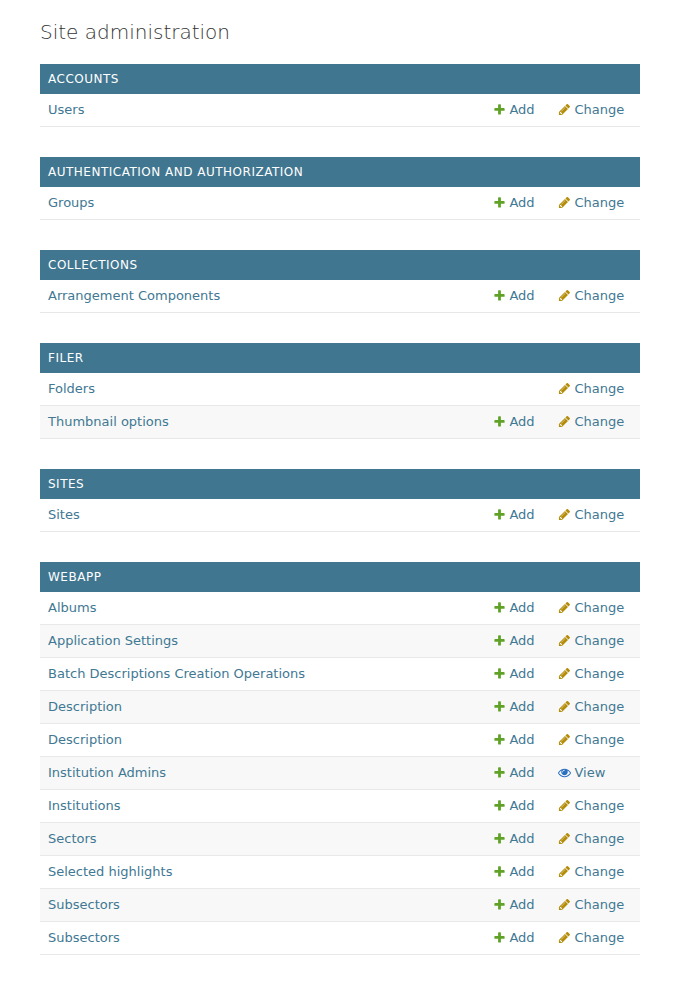
In Django Admin, the SuperAdmin accesses users, permissions, and sensitive instance settings.
Internal panel address
By default, the panel is at /admin/. The path can be changed with the ADMIN_PATH variable in the .env file (for example, ADMIN_PATH=management/), which helps reduce automated access attempts. See: Security and HTTPS.
Good practices
- Avoid using shared generic accounts. Prefer named individual accounts.
- For Institutions with manual validation (Curation), maintain a clear approval workflow (who approves, within what timeframe, and how the decision is recorded).
- Write down and keep the
adminuser password created during installation; it is shown only once. - When changing
ADMIN_PATH, let the team know and update internal bookmarks/shortcuts. - Keep the panel accessible only over HTTPS and, if possible, with a custom
ADMIN_PATH.
Common problems
- The panel does not open at
/admin/: check whetherADMIN_PATHwas changed in.env. Use the configured path (for example,/management/). - I cannot sign in to the panel: check that the user is “Is admin” (is_staff) or a superuser. Without that, they cannot access Django Admin.
- I forgot the superuser password: create another superuser from the terminal (see Linux or Windows) or use the “Change password” option in the user record, if you still have access.
- I changed an Application Setting and nothing happened: for Anubis, Farinha must be restarted. See Security and HTTPS.