Places
“Places” are how Farinha represents the real structure of an institution (sectors, units, spaces, teams). This helps organize information and also segment permissions and responsibilities.
What counts as a Place
- Institution (described according to ISDIAH)
- Sector, Subsector, Sub-subsector (Farinha abstractions for representing the internal organization)
In practice, each Place can bring together holdings and actions (for example: creation of Fonds and Collections) according to the assigned permissions.
Who can do what
- Place Admin: can create Fonds/Collections within the Place and manage administrators (if this option is available on the screen).
- SuperAdmin: can also administer through the internal panel, as well as create/edit data and permissions.
Manage Administrators of a Place
When you are the Place Admin, the “Manage Administrators” button appears on the Place page.
Step by step:
- Open the Place page (Institution, Sector, Subsector, or Sub-subsector).
- Click “Manage Administrators”.
- On the screen, use the two lists:
- “All Users” (on the left)
- “Administrators” (on the right)
- Move people to the “Administrators” list.
- Click “Save”.
Important notes:
- The screen has filters. If a filter is active, the “Save” button may become unavailable. Clear the filters before saving.
- A Place Admin of a Place “above” (for example, an Institution) usually keeps powers in the Places “below” (for example, Sectors of that Institution).
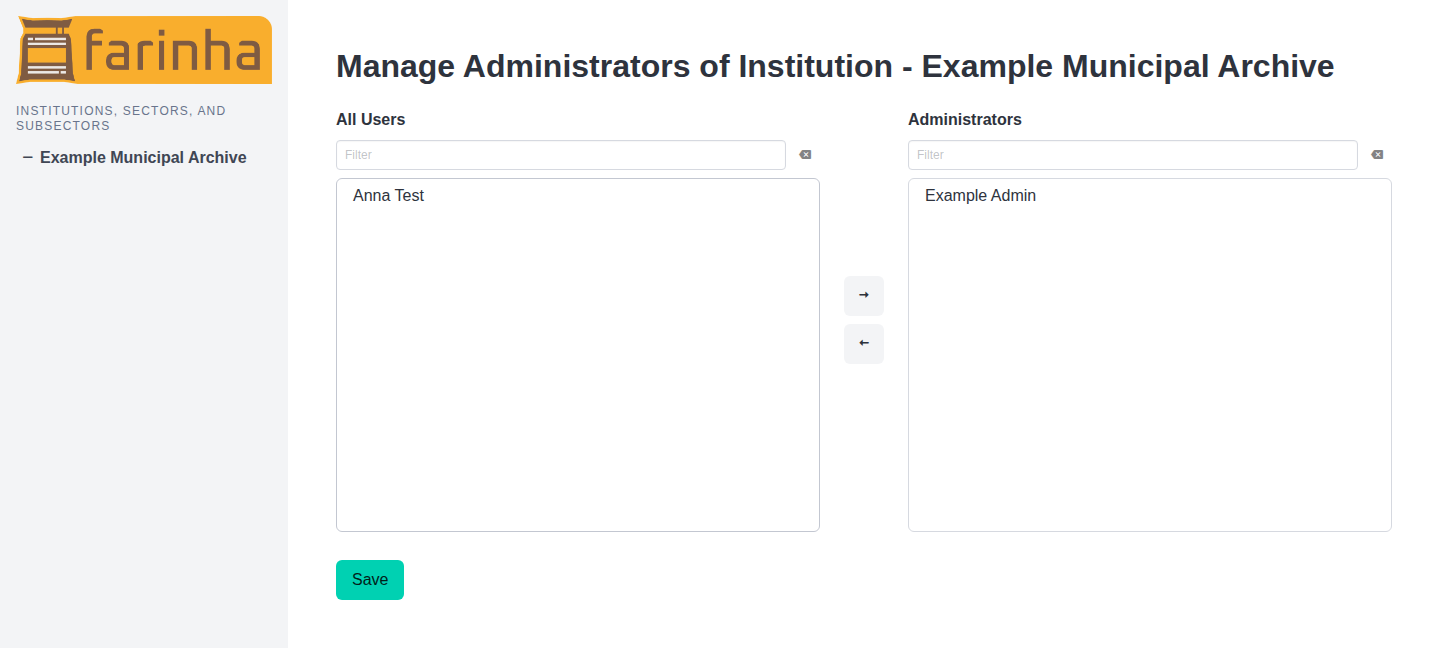
Use the lists to move users to Administrators and save the Place configuration.
Common problems
- The “Manage Administrators” button does not appear: you are probably not the Place Admin of this Place (or of a Place above it).
- I cannot save: clear active filters in the lists and try again.